

Google Analytics is under increasing pressure due to EuGH rulings.
With the analytics tool matomo, a privacy-compliant replacementis
available .
Engagement of the Javascript-Tracking-Code
The integration in a Smartstore Shop is simple and fast
After the confuguartion in the matomo account, the Javascript-tracking-Code will be published in a Smartstore widget zone.

CMS -> Pages & Content
Create new content there.
Assign a system name and mark the content as published.
Aktivate "Display as HTML widget" and select the widget zone
"head_html_tag".
Select "Analytics" as the type of cookies.
This setting controls whether or not the Analytics code is executed
according to the visitor's cookie settings.
Paste the Javascript-Tracking-Code in the Code view of the editor and save the changes made.
Adding the cookie notice for the use of matomo Analytics.
Open the privacy section in the store.
Configuration -> Settings -> Costumers, "Privacy" tab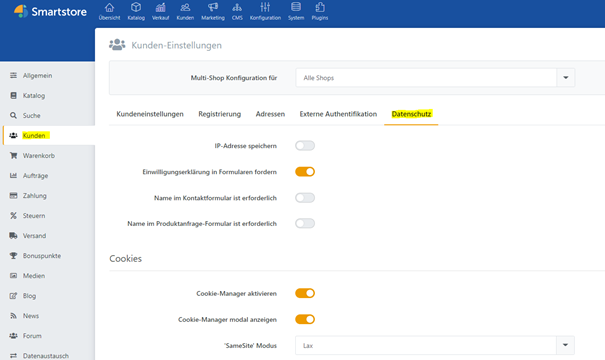
In the "Register your own cookie information" area, create a new entry for matomo.
Add a name and a description and select "Analytics"
as the type of cookie.
Finally, save the changes.
From now on, user behavior will be tracked by visitors who have givien consent for the use of matomo in the Cookie Manager 
The evaluation are then available in matomo account.
When using matomo, a corresponding note must be added to the privacy statement.
Further information on
the use of matomo in accordance with data protection regulations can be found under the following link:
https://www.it-recht-kanzlei.de/matomo-richtig-verwenden-dsgvo.html?print=1