
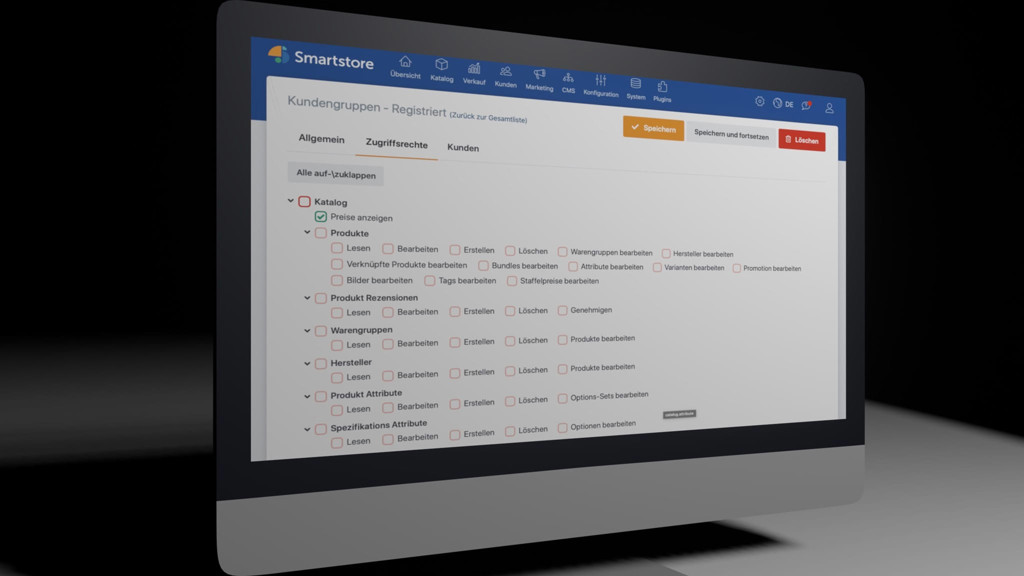
Smartstore offers a detailed permissions system for managing user roles and access rights. This allows you to precisely define which areas and functions of the shop are available to individual customer groups. The permissions system is already included in the Community Edition.
Detailed and hierarchical permissions management
The visual access rights editor simplifies the assignment and control of permissions. A hierarchically structured tree view allows access rights to be clearly reviewed and edited.
The focus is particularly on administration rights for shop employees. You can define in detail which areas of the administration a person may view or edit.
Good to know: Smartstore does not make a fundamental distinction between shop customers and shop employees. All persons are managed in customer management. Their access rights are organized through the customer groups to which they are assigned. A customer belongs to at least the
GuestsorRegisteredcustomer group.
Numerous finely graded access rights
The numerous access rights enable very precise control of the available functions. They cover all important areas of shop administration, such as the product catalog, content management, orders, and shopping cart. The finely graded permissions allow you, for example, to grant selected customer groups read access while denying write access.
Plugins can provide additional access rights. These can also be conveniently managed via the central access rights editor.
The editor supports the inheritance of permissions. This allows you to permit or deny entire permission areas with a single click. Subordinate permissions automatically adopt the respective setting. Inherited permissions are marked accordingly in the editor. If an individual permission is to differ from the parent setting, it can be explicitly permitted or denied.
The access rights of a customer or employee are visible on their customer edit page. Access rights are not managed directly for individual persons, but indirectly via customer groups. To change a person's permissions, the shop administrator assigns the appropriate customer groups to them or removes existing assignments.
Good to know: A customer can belong to multiple customer groups at the same time. The resulting access rights are clearly combined in their permissions view. This makes it possible to quickly check which functions are actually available.
Here are some application scenarios:
1. B2B shop with prices only after registration
Wholesalers or manufacturers often do not want to make their pricing structures publicly accessible. A Smartstore shop can therefore be configured so that customers must first register and log in before they can see prices.
This scenario is particularly suitable for pure B2B shops. Whether and under what conditions prices may be hidden should be checked in advance in accordance with the legal requirements of the respective target market.
How to implement it: Revoke the Catalog -> Display prices access right from the Guests system customer group.
2. Online catalog without ordering function
A retail store can use its shop as an extended online catalog to inform prospective customers about its product range. Ordering or pickup is not intended in this case – for example, for goods that are difficult to transport, highly perishable, or individually manufactured.
In this case, the shop serves as a pure product catalog. Prices can continue to be displayed. Wish lists and product comparisons can also remain available so that customers can prepare their purchase or share selected products with others.
How to implement it: Revoke the Shopping cart -> Access shopping cart access right from the Guests system customer group.
3. Employees with different areas of responsibility
If several employees work in a company, it is often undesirable for everyone to have unrestricted access to all areas of the shop. For example, one employee processes orders, a colleague maintains products and categories, an external employee manages editorial content, and management receives full access. In addition, all employees should receive a staff discount of 20 % in the shop.
How to implement it: Create a separate customer group for each area of responsibility, configure the required permissions, and then assign the appropriate customer groups to the respective persons.
| Person | Additional customer group | Access rights and other settings |
|---|---|---|
| Employee A | Create Order processing |
Permit the Orders area and set the subordinate permissions to Inherit. |
| Colleague B | Create Product range maintenance |
Permit the Products area and set the subordinate permissions to Inherit. |
| External employee | Create Public relations |
In the CMS area, permit the required permissions for editorial content and leave the respective subordinate permissions set to Inherit. |
| Management | Assign Administrators |
The Administrators system customer group has comprehensive access rights by default. |
| All employees | Create Staff |
Assign the permissions intended for registered customers and additionally set up a discount of 20 % under Marketing > Discounts, restricted to the Staff customer group via a shopping cart rule. |
Appropriate permissions for every area of responsibility
The permissions system is already available in the open-source Community Edition. This allows you to tailor your shop project specifically to internal processes and different areas of responsibility. Custom plugins can also be extended with additional access rights and seamlessly integrated into the central permissions management system.